151
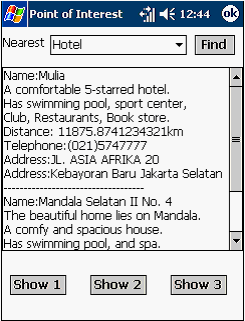
Figure 5.11 Display of POI’s List of Nearest Places based Hotel Category
After
the system has displayed all
the results
found,
the
user
then can know
the
location
of
the
place
on
map
by
clicking
button
Show 1, Show 2
or Show 3. To know
location
of
the
first
place
listed,
Show
1
is
clicked.
To
know
the
place
listed
in
the
second order on the result, Show 2 is clicked and so is the third place. The application is
designed to be capable
in
listing down only
three places and thus it enables to show the
location
up
to
only
those
three
places.
After
clicking
the
button
for
example
Show
1,
then
the
monitor
will
display
the
location
of
the
first
place
listed
in
the
result.
Figure
5.12 shows the location of Hotel Mulia on the map, represented by a red dot.
 |