146
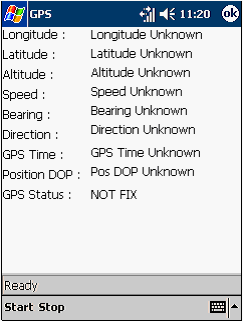
c. Menu GPS
When clicking on Menu
GPS,
it
will display the data of
GPS
like
the longitude,
latitude and altitude of the current position, and others like shown in Figure 5.5.
Figure 5.5 Display of Menu GPS
There
are
two
buttons
Start
and
Stop
at
the
bottom
left
corner
of
the
monitor.
Clicking
the
Start
will
result
in
Figure
5.6.
There
is
information
about
the
satellite
saying
the status of satellite connection and how many degree they change from
previous
position
at
the
bottom of
the
monitor.
While
user
is
moving,
the
data
also
changes and the satellite connection status will also change as to reflecting the changing
position, as seen in Figure 5.7.
 |